User Flow — Authentication
How a person signs in to the NKO ERP, how the app decides whether a request may proceed, and how the
authenticated shell (navigation, culture, notifications) is assembled. Sign-in is handled by
AccountController (in the NKO.Shared library) on top of ASP.NET Core Identity; every
subsequent request is checked by the ClaimRequirementFilter authorization filter.
Source: NKO.Lib/NKO.Shared/Controllers/AccountController.cs,
NKO.Lib/NKO.Shared/Views/Account/Login.cshtml, NKO.Main/NKO.Main/Startup.cs,
NKO.Lib/NKO.Shared/Helpers/Sec/ClaimRequirementFilter.cs,
NKO.Lib/NKO.Shared/Helpers/Sec/PermissionsHandler.cs,
NKO.Lib/NKO.Shared/Controllers/TopbarViewComponent.cs, NKO.Main/NKO.Main/Views/Shared/_Layout.cshtml.
Actors
| Actor | Role in this flow |
|---|---|
| Employee | Owns an Application login linked to an App employee record; signs in with username + password. |
| ASP.NET Core Identity | Validates the password, issues the authentication cookie, enforces lockout and (optional) two-factor. |
Claim |
Runs before every [Claim action: redirects anonymous users to login, loads the caller's permissions, blocks callers who lack the required key. |
Account |
Renders the login page, processes the sign-in POST, handles forced password change and sign-out. |
Preconditions
- The person has an
ApplicationUserrecord whoseUserNameis their login, linked to anAppUserbyAppUser.IdentityUserId == ApplicationUser.Id. ApplicationUser.IsEnableLogin == true. If it isfalse, the password is never checked as valid and the account resolves to an empty permission set.- The employee belongs to at least one enabled group (
AppUserGroupMember.IsEnable) — otherwise they authenticate but can open nothing except the"General"endpoints.
Sign-in flow
sequenceDiagram
    actor U as Employee
    participant MW as Auth middleware
    participant F as ClaimRequirementFilter
    participant AC as AccountController
    participant ID as ASP.NET Core Identity
    participant TA as Target action

    U->>MW: GET /HumanResource without cookie
    MW->>F: authorize
    F-->>U: 302 to /Account/Login with ReturnUrl
    U->>AC: GET /Account/Login
    AC-->>U: Login page
    U->>AC: POST /Account/Login with Username and Password
    AC->>ID: FindByName then CheckPassword
    alt wrong password
        ID-->>AC: invalid
        AC->>ID: send Security Alert email to the account owner
        AC-->>U: generic error message
    else login disabled
        AC-->>U: generic error message
    else password ok and login enabled
        AC->>ID: PasswordSignIn persistent with lockout
        ID-->>U: set Identity auth cookie
        alt two-factor required
            AC-->>U: 302 to /Account/VerifyCode
        else initial password
            AC-->>U: 302 to /Account/Security
        else normal
            AC-->>U: 302 to ReturnUrl
        end
    end
    U->>MW: GET /HumanResource with cookie
    MW->>F: authorize
    F->>ID: load permissions for the user
    F->>F: check the action key is present
    alt has the key
        F->>TA: continue and set CurrentRequestData
        TA-->>U: page
    else missing
        F-->>U: 302 to /Error/UnAuthorised status 403
    end
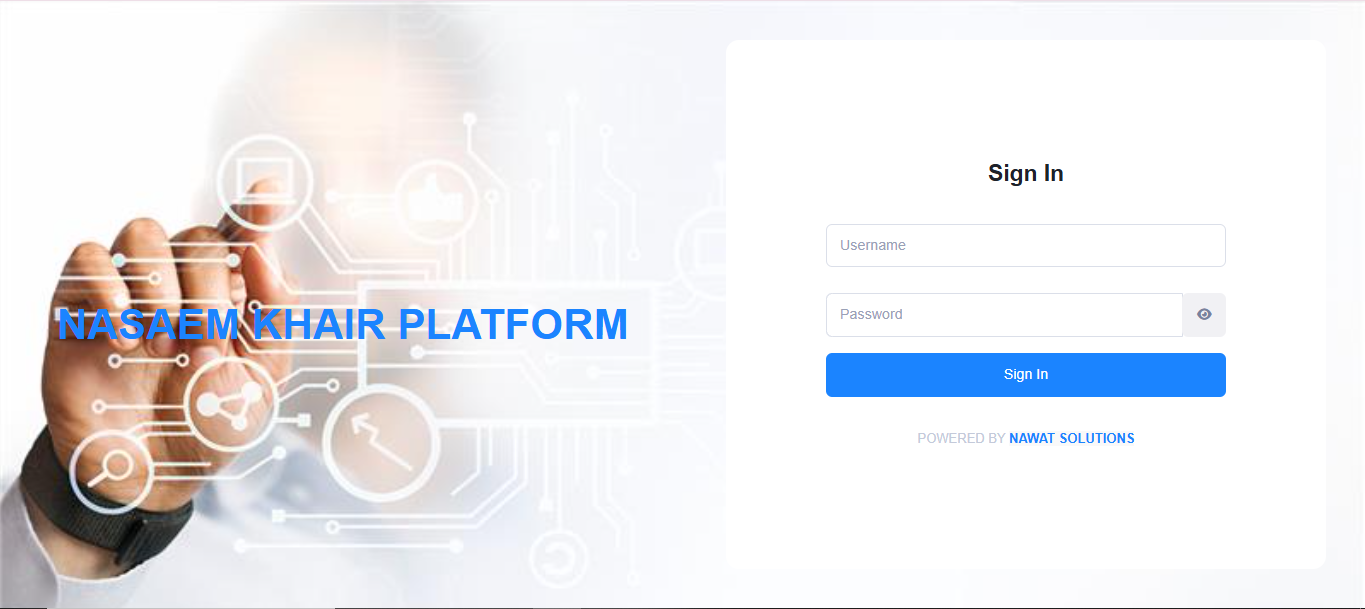
The sign-in screen (/Account/Login):
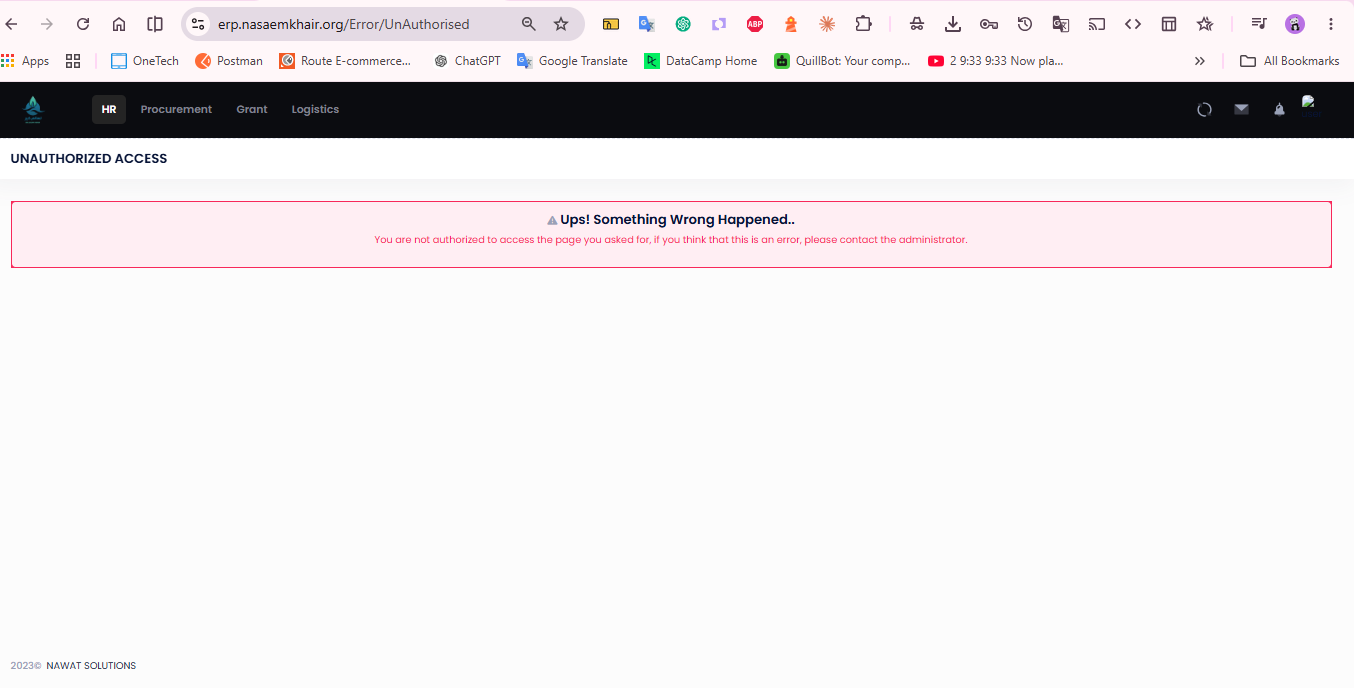
Where an authenticated user lands when they lack the action's permission key
(/Error/UnAuthorised):
Step-by-step
| # | Actor | Screen / route | Code path | Data touched | Result |
|---|---|---|---|---|---|
| 1 | Employee | any [Claim route while anonymous |
Claim |
— | 302 → ~/ |
| 2 | Employee | GET / |
Account |
— | Login. (Layout = null; AdminLTE/Metronic; "Sign In" form) |
| 3 | Employee | POST / |
Account — [Validate |
Application, App (read) |
see branches below |
| 3a | Identity | — | User fails |
— | e-mail "Security Alert" to the account owner; generic error message; stay on page |
| 3b | Identity | — | user. |
— | generic error; no sign-in |
| 3c | Identity | — | Sign |
Identity cookie issued; App tracking row via Set |
authenticated |
| 4 | Account |
— | user. |
— | 302 → / (forced change) |
| 5 | Account |
— | 2FA required (Is2 or Two) |
— | 302 → / (or Lockout view when locked) |
| 6 | Account |
— | normal success | — | 302 → return (falls back to / → Home) |
| 7 | Claim |
first authenticated request | Permissions |
Application, App, App (read) |
populates Current + .; 403 → / if the action's key is missing |
Forced password change
ApplicationUser.IsPasswordDefault is set when an account is created with an initial password (see
HR Onboarding). While it is true, a successful sign-in redirects to
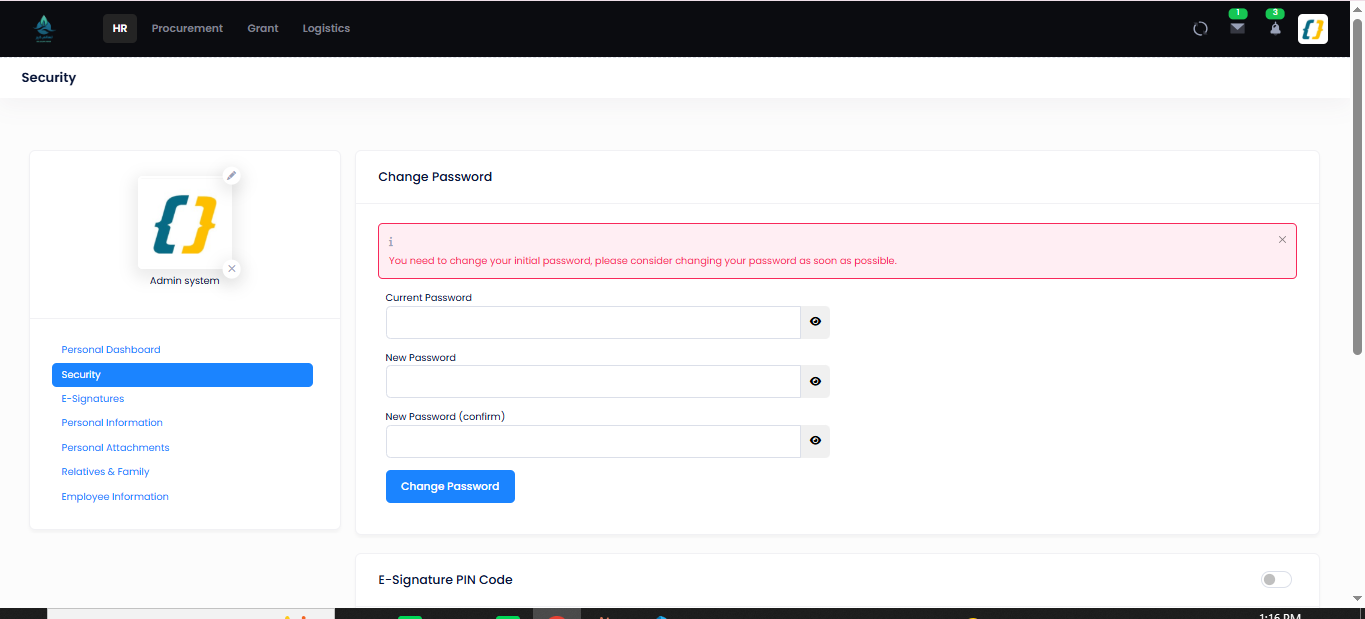
GET /Account/Security and a banner reads "You need to change your initial password, please
consider changing your password as soon as possible."
POST /Account/Security calls UserManager.ChangePasswordAsync; the new password must be at least
8 characters and match the confirmation field. On success IsPasswordDefault is cleared and the user
continues to the app. Security itself is guarded by the AccountChangePassword permission key.
/Account/Security — change password (with the initial-password banner), plus the E-Signature PIN
and per-signature security-email settings on the same page:
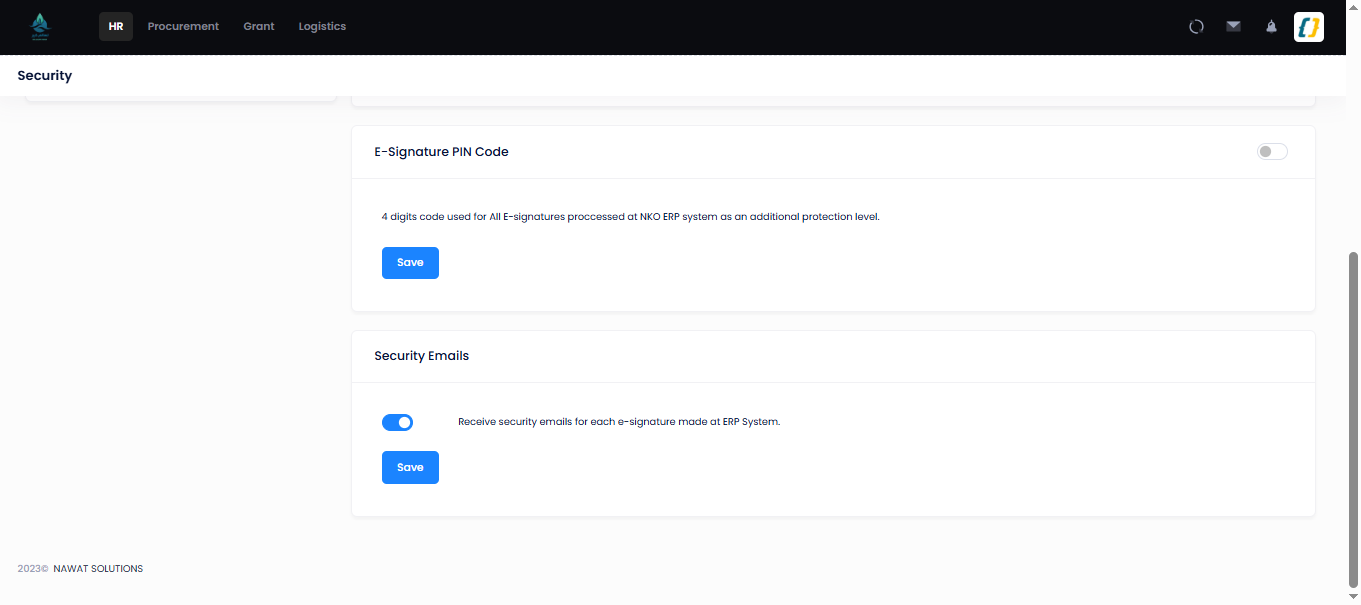
The E-Signature PIN set here is the 4-digit code checked by VerifyPin on the approval actions
(e.g. Leave Management).
Two-factor and lockout
- Two-factor — when
ApplicationUser.Is2FAMandatory == trueorTwoFactorEnabled == true, the controller usesSignInManager.PasswordSignInAsyncand, onRequiresTwoFactor, redirects toGET /Account/VerifyCode?ReturnUrl=…for one-time-code entry. - Lockout — configured, but never triggered by a wrong password.
Loginvalidates the password withUserManager.CheckPasswordAsyncfirst, and that method does not touchAccessFailedCount. On a wrong password the branch sends the Security Alert mail and returns the view, soPasswordSignInAsync— the only call that increments the failure counter — is never reached. The counter therefore stays at 0 and the account never locks, no matter how many attempts are made. Two further details: the non-2FA path signs in throughSignIn(user, pass)withlockoutOnFailure: true, but only after the password has already been confirmed correct; the 2FA path callsPasswordSignInAsync(username, password, false, false)with lockout disabled outright. TheLockoutview is reachable only via that 2FA path. Tracked as R6-7. - Password policy (
Startup.cs → AddIdentity): minimum length 8; digits, uppercase, lowercase and non-alphanumeric characters are not required.
Session, culture, and the navigation shell
- Scheme —
AddAuthenticationasks for JWT Bearer as the default scheme (secretJwtConfig:Secret), butAddIdentityruns immediately afterwards and resets the defaults to the Identity application cookie, which is what actually authenticates the browser UI.ConfigureApplicationCookiesetsAccessDeniedPath = /Error/UnAuthorised. See Security & Permissions. - Immediate effect — the permission set is re-read from the database on every gated request, so
disabling a login or changing a user's groups takes effect on their next request. It does not
sign them out: a disabled login stays signed in but gets an empty permission set.
(
SecurityStampValidatorOptions.ValidationInterval = TimeSpan.Zeroadditionally re-validates the cookie's security stamp on every request.) - Per-request context — on every
[ClaimRequirement]action the filter stores the caller'sAppUserand permission list in the scopedCurrentRequestData; controllers, views and view components read from it rather than re-querying Identity. - Culture —
UseRequestLocalizationsupportsen(default),ar,trvia query string, then cookie, thenAccept-Language. Arabic translates the text but does not switch the layout to right-to-left:_Layout.cshtmlcomputesrtl, but itsdirattribute and RTL stylesheet are commented out, and no RTL stylesheet ships — the only live effect is that toast notifications move to the left (R6-9). - Shell — authenticated pages render through
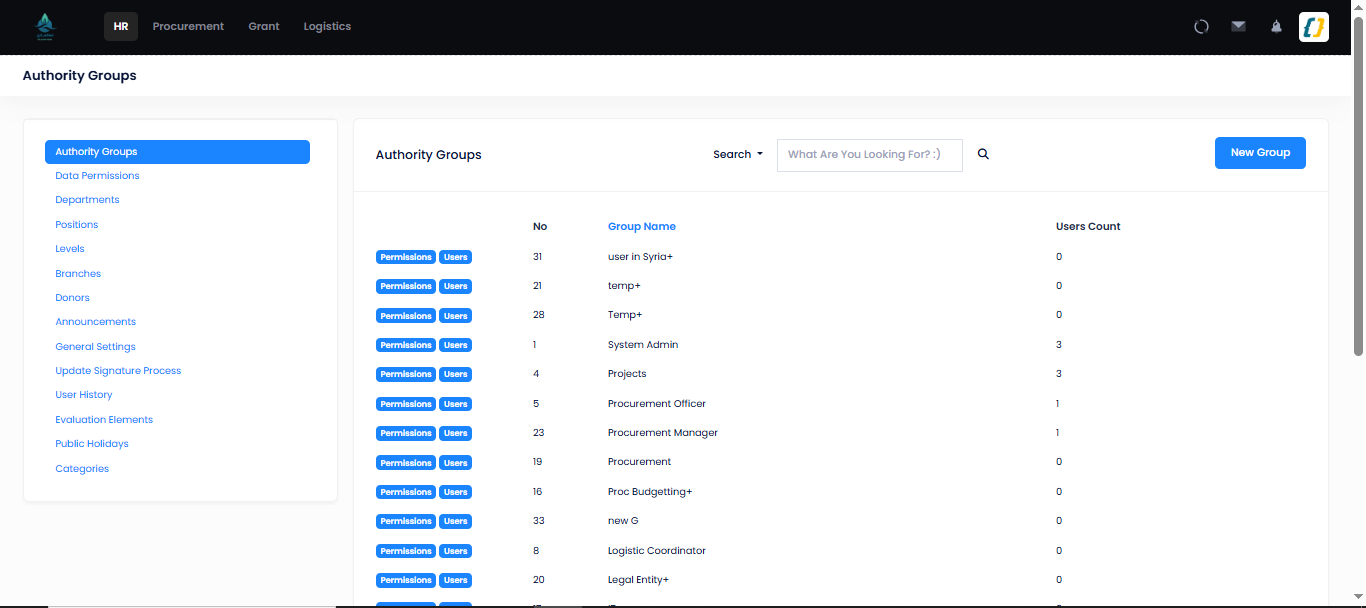
_Layout.cshtml, a Metronic theme (set in_ViewStart.cshtml;_AppLayout.cshtmlis used only by the public/Apps/*portal pages). One view component builds the chrome — the navigation is a top bar, not a sidebar: TopbarViewComponent→ the module menus, unread notifications (NotificationUserwhere!IsRead) and a single "requests waiting on me" badge (ViewBag.RequestCounts) summed across leaves, advances, overtime, timesheets, payroll, trainings, jobs, evaluations, pending e-signatures and unjustified attendance delays. Menu entries (78HasPermissioncalls in the top bar alone) and in-page controls are shown or hidden withPermissionChecker.HasPermission("<key>")— see Permissions.
SidebarViewComponent also exists, but nothing invokes it, and Views/Base/SidebarUserPanel.cshtml
is referenced by nothing — both are dead code.
The authenticated shell — the top navigation (filtered to the modules this account may open) and the top bar with the mail / notifications icons:
Sign-out
AccountController.LogOut calls SignInManager.SignOutAsync() (which clears the Identity cookie) and
redirects to /. The next request is anonymous and step 1 applies again.
Edge cases
| Situation | Behaviour |
|---|---|
| Unknown username / wrong password | Generic message "اسم المستخدم أو كلمة السر خاطئة"; on a known user with a wrong password a "Security Alert" e-mail is sent to that user. The failure counter is not incremented — see Lockout above. |
Known login with no linked App row |
Login dereferences app to compose the Security Alert before null-checking it, so a wrong password on such an account throws a Null — which, per R1-1, renders the developer exception page. Tracked as R6-8. |
Is |
Same generic message; never signs in. |
| Authenticated but missing the action's permission key | Forbid + HTTP 403 → redirect to /. |
| Group membership disabled mid-session | Stays signed in; that group's keys are gone on the next request, because permissions are re-read from the database every request. Nothing updates the security stamp, so the cookie itself stays valid. |
| Employee has no enabled group | Signs in, but only "General" endpoints (profile, look-ups, dashboards) resolve; everything else 403s. |
| Direct hit on a deep URL while anonymous | Preserved as Return and reopened after a successful sign-in. |
/ doubled path segments |
Collapsed to / by a middleware shim before routing. |
Related
- Permissions — groups, permission keys, data scoping, the org hierarchy.
- HR Onboarding — how the
ApplicationUserlogin and initial password are created. - Security & Permissions — the architectural view of the same model.
- API Overview — authorization as it applies to controller actions.