User Flow — Leave Management
How an employee requests time off (full-day leave, hourly leave, or a short "permission" / absence
justification), how it is approved (Requester → Manager → HR — except annual leave, which the manager approves outright, and
paid-exceptional leave, which goes on to the GM after HR),
and how an approved leave consumes balance and shows on the attendance calendar. All of it lives on
TimesheetController; the workflow is LeaveContextActions and the state machine is LeaveStatus.
Source: NKO.Main/NKO.Main/Controllers/TimesheetController.cs, NKO.Main/NKO.Main/BAL/BLeave.cs,
NKO.Lib/NKO.Shared/Helpers/Leave/LeaveTypeCodes.cs,
NKO.Lib/NKO.Shared/Helpers/CommonConstants.cs (LeaveUserTypes, LeaveOpTypes),
NKO.Lib/NKO.Shared/ViewModels/Training/TrainingStatus.cs (LeaveStatus).
Actors
| Role | LeaveUserTypes |
Does |
|---|---|---|
| Requester | Requester |
Creates and sends the leave; may cancel while in Draft. |
| Manager | Manager |
First approval — and the only approval for annual leave. Resolved by BUser., i.e. the requester's Manager. If the requester named no substitute, the approving manager is recorded as the substitute. |
| HR | HR |
Second approval for every type except annual; can also cancel an approved leave. Resolved by BUser. — the HR holder of the requester's branch, not the organisation-wide HR manager. |
| General Manager | GM |
Final approval, only for paid-exceptional leave (Leave), after HR. Resolved by BUser.. |
| Substitute | — | substitute — the colleague covering during the absence. |
Preconditions
- The requester has a valid contract on the leave date and a calendar profile
(
attendancesHandler.GetCalendarProfileConfig). - Leave balance exists for the type (
LeaveBalanceperLeaveType), created at onboarding (Timesheet/CreateLeaveBalance,ImportData) — see HR Onboarding. - The requester has set a PIN;
LeaveContextActionscallsuserObject.VerifyPin(PIN)and returns401on a wrong PIN. - Every approver has an approved e-signature — each approval step calls
BSign.HasSign.
Flow
flowchart TD
    A["Timesheet/CreateLeave - type, dates, description, attachment, substitute"] --> B["BLeave balance check"]
    B -- Rejected --> B1["Blocked - insufficient balance"]
    B -- AcceptedWithJustification --> C["Draft - justification required"]
    B -- Accepted --> C
    C --> S["Requester sends with PIN"]
    S --> M["WaitingForManager"]
    M -- ManagerRefuse --> R["Refused - back to requester"]
    M -- ManagerAccept --> AN{"Annual leave?"}
    AN -- yes --> ACC["Accepted"]
    AN -- no --> HR["WaitingForHR"]
    HR -- HRRefuse --> R
    HR -- HRAccept --> H{"Paid-exceptional type?"}
    H -- no --> ACC
    H -- yes --> GM["WaitingForGM"]
    GM -- GMRefuse --> R
    GM -- GMAccept --> ACC
    ACC --> E["Balance consumed, calendar day Leave, CompleteLeave on return"]
    ACC -- HRCancel --> CAN["Cancelled - balance returned"]
sequenceDiagram
actor RQ as Requester
participant MG as Manager
participant HR as HR
participant GM as General Manager
RQ->>MG: Send
MG-->>RQ: ManagerRefuse then Refused
alt annual leave
MG->>RQ: ManagerAccept then Accepted
else every other type
MG->>HR: ManagerAccept
HR-->>RQ: HRRefuse then Refused
alt paid-exceptional leave
HR->>GM: HRAccept
GM->>RQ: GMAccept then Accepted
else
HR->>RQ: HRAccept then Accepted
end
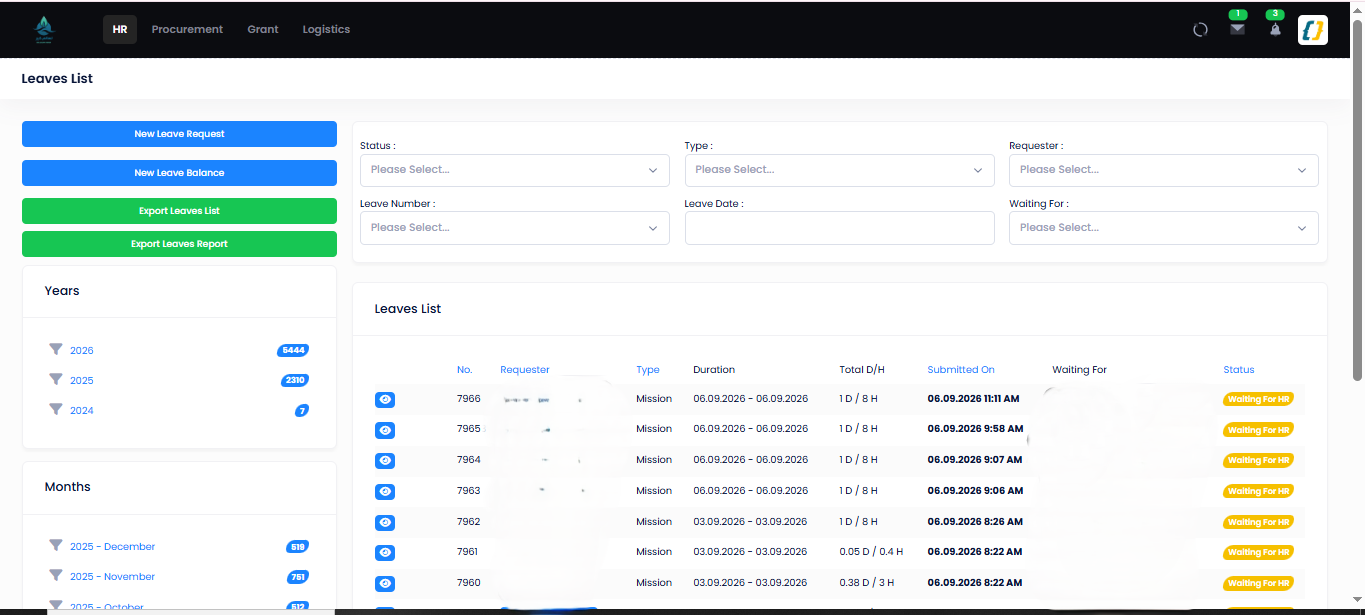
endThe leaves register with year filters and actions (/Timesheet/Leaves):
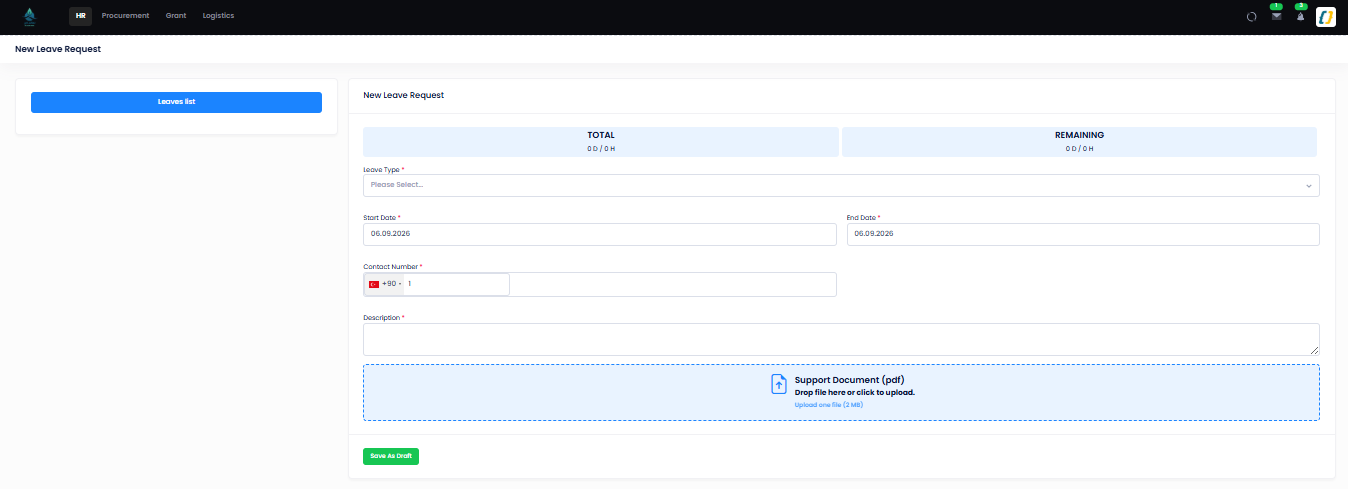
Step 1 — the leave request form: balance (TOTAL / REMAINING), leave type, dates, description,
attachment, substitute (/Timesheet/CreateLeave):
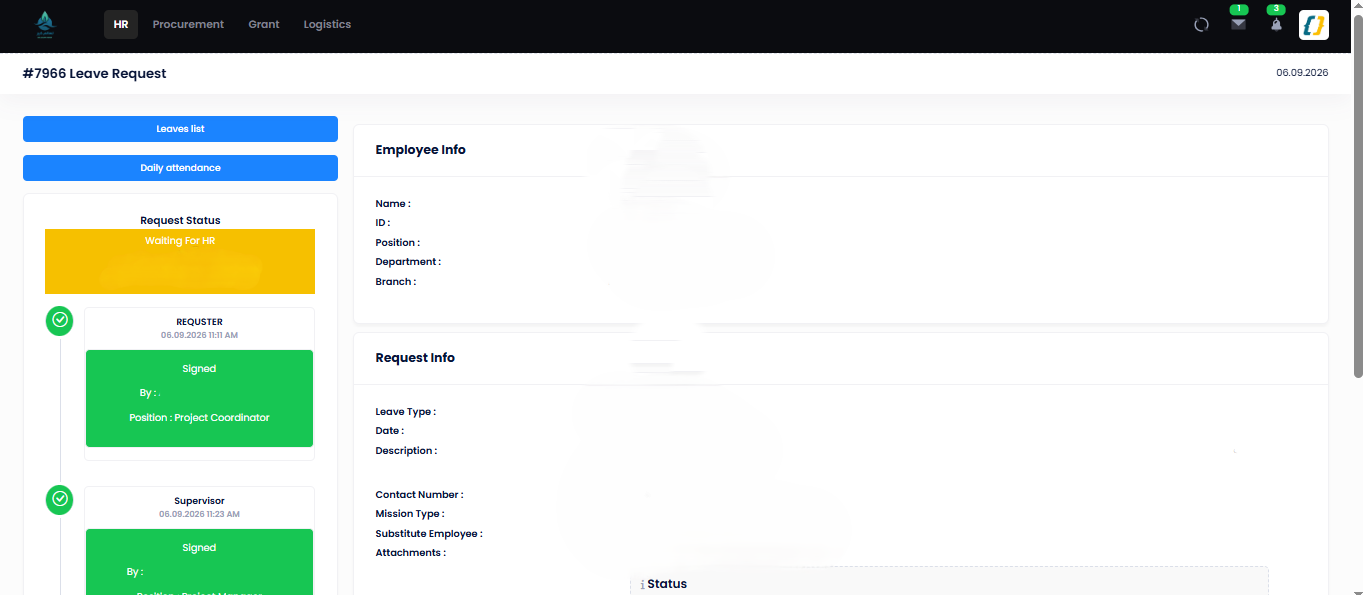
A leave in the approval chain — Requester → Supervisor → HR, status "Waiting For HR" (signer names
masked; /Timesheet/LeaveDetails/{guid}):
Step-by-step
| # | Actor | Screen / route | Permission key | Effect |
|---|---|---|---|---|
| 1 | Requester | GET/ |
Timesheet |
Validates contract, dates (no past-month), type-specific rules, then BLeave checks balance → Leave. Creates a Leave with Status, Req. |
| 2 | Requester | GET / |
Timesheet |
Review screen with the action buttons. Edit while still Draft; Delete / Leave. |
| 3 | Requester | POST / · Requester / Send + PIN |
Timesheet |
BLeave. → Waiting; notifies the manager (LEAVE_WAITINGYOU). |
| 4 | Manager | POST / · Manager / Manager | Manager |
Timesheet |
Set → Accepted (3) for annual leave, otherwise Waiting; Set → Refused (4). |
| 5 | GM (paid-exceptional only, after HR) | POST / · GM / GMAccept | GMRefuse |
Timesheet |
Reached only after HR. Set → Accepted (3); Set → Refused. |
| 6 | HR | POST / · HR / HRAccept | HRRefuse | Cancel |
Timesheet |
Set → Waiting for paid-exceptional leave, otherwise Accepted (3) (LEAVE_APPROVED); Set → Refused; Set → Cancelled (5) (LEAVE_CANCELLED), balance returned. |
| 7 | Requester / HR | GET/ |
Timesheet |
Closes the leave on return from an open-ended type. |
| — | HR | GET /, GET / |
Human, Timesheet |
Per-employee and org-wide leave registers (filter by status / type / "waiting for"). |
Status values (LeaveStatus)
| Id | Name | Meaning |
|---|---|---|
| 0 | Draft |
Created, not sent. |
| 1 | Waiting |
With the requester's direct manager. |
| 6 | Waiting |
With the General Manager — paid-exceptional only, after HR. |
| 2 | Waiting |
With HR — the final approval for most types. Annual leave never reaches it. |
| 3 | Accepted |
Approved — balance consumed, calendar updated. |
| 4 | Refused |
Sent back; requester edits and re-sends. |
| 5 | Cancelled |
Cancelled by HR after approval; balance returned. |
Leave types (LeaveTypeCodes)
Annual (1), UrgentSick (2), Marriage (3), Paternity (4), Maternity (5), Nursing (6),
Sick (7), Beareavement (8), Idda (9), ReligiousDuties (10), UnpaidExceptional (11),
PaidExceptional (12), Misson (13), Study (14), Other (15), OvertimeAllowance (16).
- Can be hourly:
{1, 2, 6, 12, 13, 14, 15, 16}(LeaveTypeCodesHourly).Nursingis always hourly and auto-sized to 1h30m. Hourly leave is not available to Education-profile contracts. - Attachment required:
Nursing,Sick,Study. - Description required: every type except
Annual. - Conditions checkbox required:
PaidExceptional, andMissonwhen the mission type is Work From Home. Missonalso requires aMissonType(Meeting,Training,Field,Travel,Campaigns,WorkFromHome,Other).
Short "permission" / absence justification
A short excuse is the same Leave record created with IsJustification = true (route parameter
IsJustification), a single date, FromTime/ToTime (making it IsHourly), and optionally an
absentId linking the Attendance day it explains, or a delay value for a late check-in. It runs
through the identical Requester → Manager → HR chain. Past-month justifications are rejected.
Balance and calendar effect
- The balance check (
LeaveBalanceDetailsVM) returnsLeaveResult:Accepted,AcceptedWithJusitification(allowed but flagged / attachment expected), orRejected(blocked). Balance is measured in days; hourly types convert at 8 h/day. - On
Accepted, the days becomeDayType.Leaveon the attendance calendar (CalendayDays/Attendance), and the unpaid type (UnpaidExceptional) reduces paid days in Payroll. CreateLeaveBalance/ImportData/TransferLeaves(HR) top up or carry overLeaveBalance(LEAVEBALANCE_ADDED).
Edge cases
| Situation | Behaviour |
|---|---|
| Wrong or missing PIN | Leave returns 401 Unauthorized; no transition. |
| Leave date in a closed (past) month | Create rejects: "You are't allowed to take leave for the past month!." (sic) |
| Insufficient balance | Leave — the request cannot be created. |
| Required attachment missing (Nursing / Sick / Study) | Validation error: "File is Required." |
| Manager or HR refuses | Refused — the requester edits and re-sends from Draft. |
| Paid-exceptional without GM | Cannot reach Accepted; it waits at Waiting. |
| No valid contract on the date | "You don't have any valid contract." (also shown when the branch has no calendar profile for that date) |
| Education-profile contract | Hourly leave is refused — and since Nursing is always hourly, Education staff cannot take Nursing leave at all. |
Related
- Payroll — unpaid leave reducing paid days.
- HR Onboarding — opening leave balances.
- Permissions — how Manager / HR / GM are resolved from the hierarchy.
- Payroll module · HR database · API — Payroll.