User Flow — Permissions
How the NKO ERP decides who may do what. The model has five independent layers: a login identity, group-based permission keys that gate each action, inline checks that show or hide UI, row-level data scoping by branch, and an org hierarchy that limits a manager to their own staff.
Source: NKO.Lib/NKO.Shared/Helpers/Sec/PermissionsHandler.cs,
NKO.Lib/NKO.Shared/Helpers/Sec/ClaimRequirementFilter.cs,
NKO.Lib/NKO.Shared/Helpers/Sec/HasPermission.cs (PermissionChecker),
NKO.Lib/NKO.Shared/BAL/Permissionchecker.cs (StaffPermissionchecker),
NKO.Lib/NKO.Shared/Helpers/CommonConstants.cs (SharedPermissions, DataPermissionType),
NKO.Main/NKO.Main/Controllers/BaseController.cs, NKO.Main/NKO.Main/Controllers/AdminController.cs.
Two identities per person
| Record | Purpose | Key link |
|---|---|---|
Application |
ASP.NET Core Identity login: username, password hash, lockout, 2FA, Is, Is. |
Id |
App |
The HR employee: name, code, branch, position, Manager / Tech, Status. |
App |
Almost all code works with AppUser (via CurrentRequestData.Employee); Identity is only touched at
sign-in and for password / 2FA operations.
Groups and permission keys
A person's effective permissions are the union of the permission keys of every enabled group they
belong to. Groups (AppUserGroup) are the system's notion of a role — there is no fixed role
list; an administrator creates groups and assigns keys.
flowchart TD
    P[Person] --> AU["ApplicationUser - the login"]
    P --> EMP["AppUser - the employee"]
    AU -. IdentityUserId .-> EMP
    EMP --> M["AppUserGroupMember - IsEnable true"]
    M --> G["AppUserGroup - the role"]
    G --> GP[AppUserGroupPermission]
GP --> AP["AppPermission - PermissionName is the key"]PermissionsHandler.GetUserPermissions(username):
- Load
ApplicationUserbyUserName, then theAppUserbyIdentityUserId. - If
ApplicationUser.IsEnableLogin == false→ return an empty list (the account can reach nothing that needs a key). - Otherwise load
AppUserGroupMemberrows whereIsEnable == true, includeAppUserGroup → AppUserGroupPermission → AppPermission, and collect everyAppPermission.PermissionNameinto aList<string>.
Keys are free-form strings, conventionally "<Area><Action>" — e.g. HumanResourceIndex,
HumanResourceEdit, AccountChangePassword, HumanResourceSignatures. The special key General
means "any authenticated employee" and guards shared look-ups and dashboards. (The two navigation
view components also carry [ClaimRequirement("General")], but there it is inert — MVC does not run
authorization filters for view components.)
How a request is authorized
Every gated action carries [ClaimRequirement("<key>")]. The filter runs before the action:
flowchart TD
    A["Request to /Controller/Action"] --> B{"Authenticated?"}
    B -- no --> C["302 to /Account/Login"]
    B -- yes --> D["Load user permissions"]
    D --> E{"IsEnableLogin?"}
    E -- no --> F["permission list empty"]
    E -- yes --> H["permission list = union over enabled groups"]
    F --> K{"required key present?"}
    H --> K
    K -- no --> L["Forbid 403 to /Error/UnAuthorised"]
    K -- yes --> M["set CurrentRequestData Employee and Permissions"]
    M --> N["action executes"]
    N --> O{"needs row-level scoping?"}
    O -- no --> R["return view or JSON"]
    O -- yes --> SC["GetPermission area: All / Location / Custom / Default"]
    SC --> Q["filter query by branch or staff subtree"]
    Q --> R
Because the check re-reads groups on every request and the security stamp is validated with a zero interval, changing a user's groups or disabling their login takes effect on their next click.
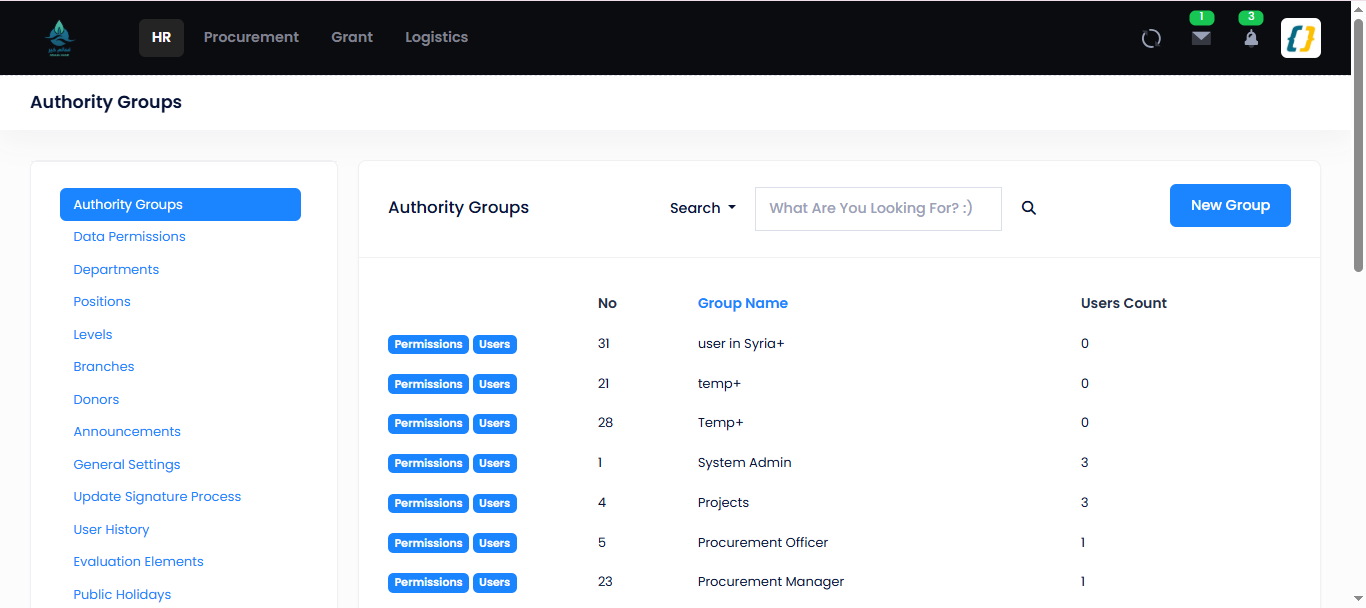
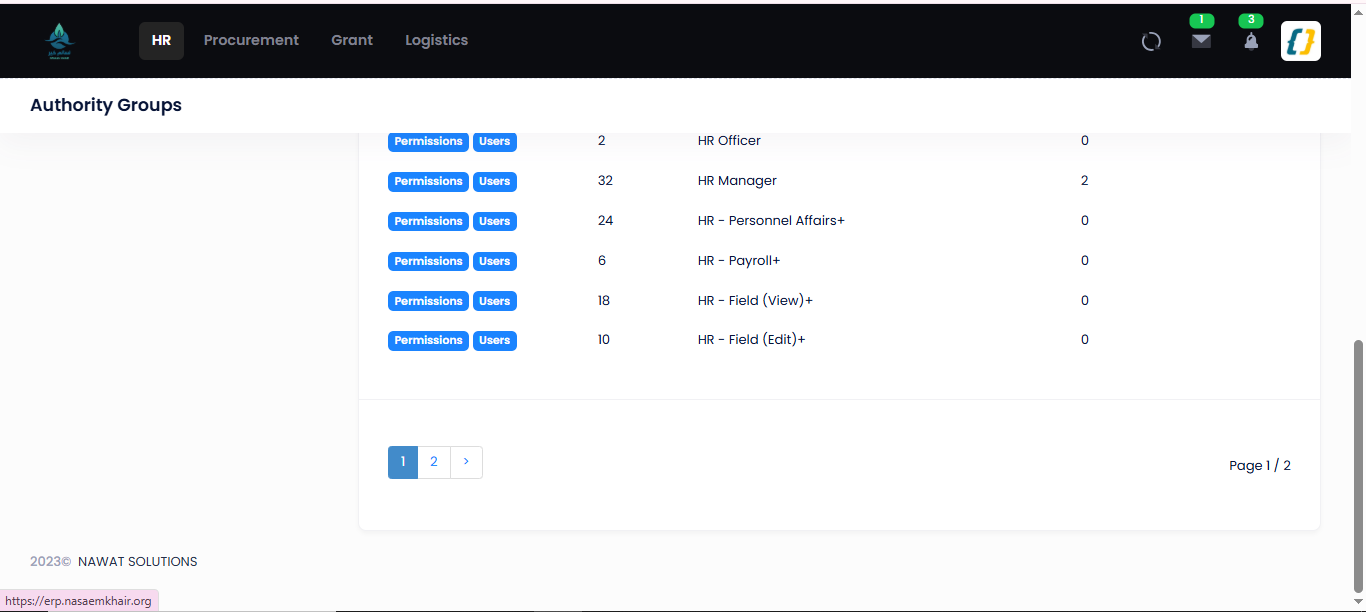
Groups (roles) — /Admin/UserGroups:
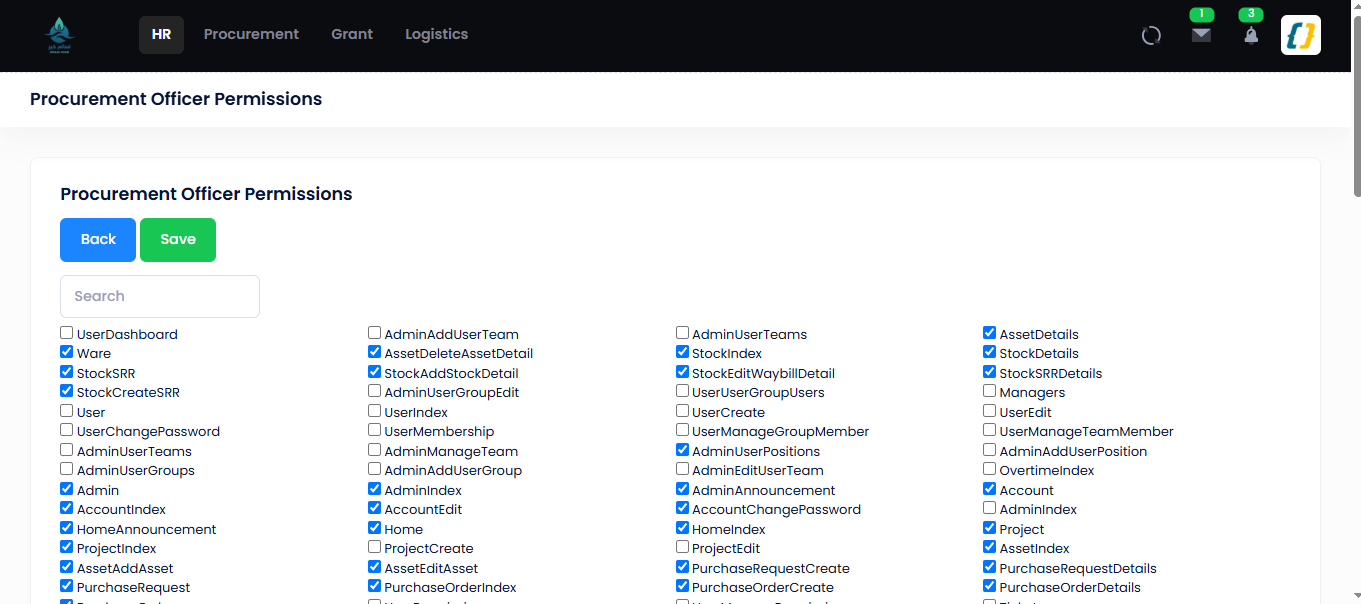
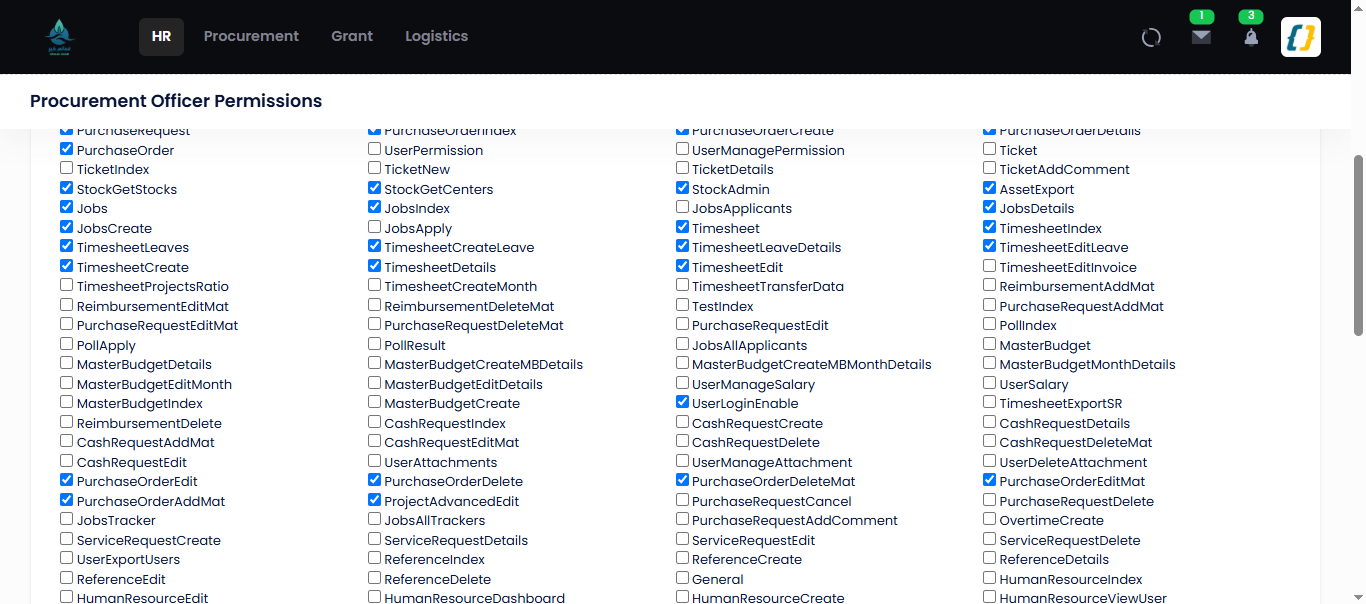
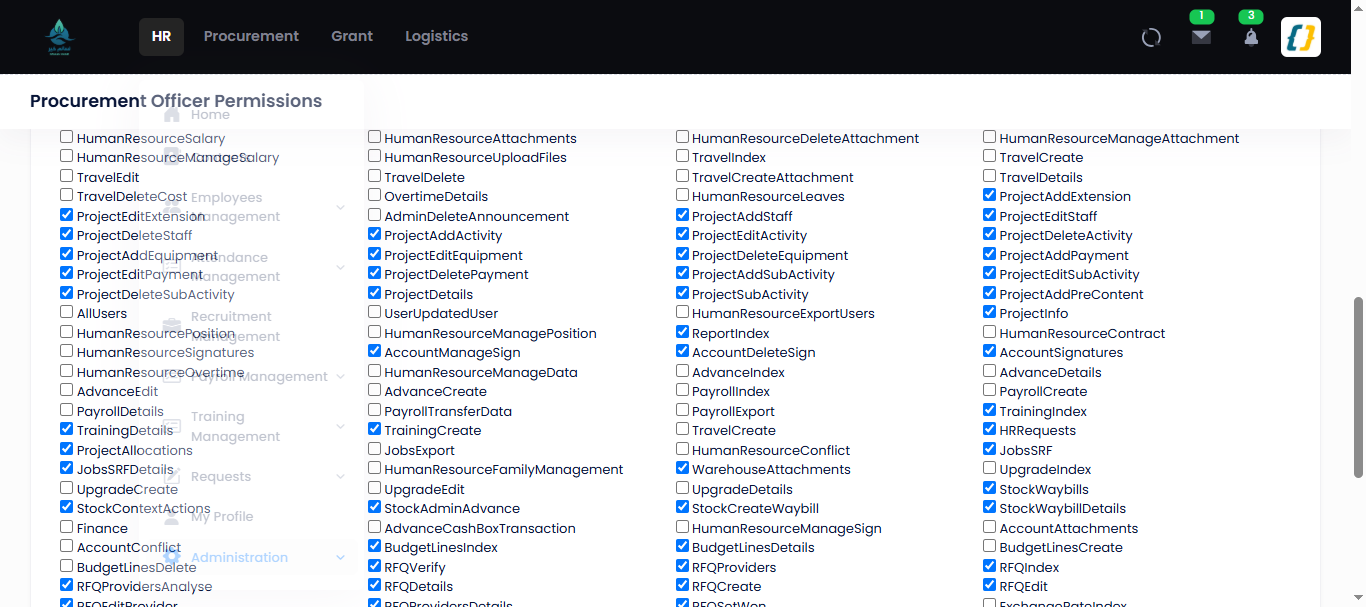
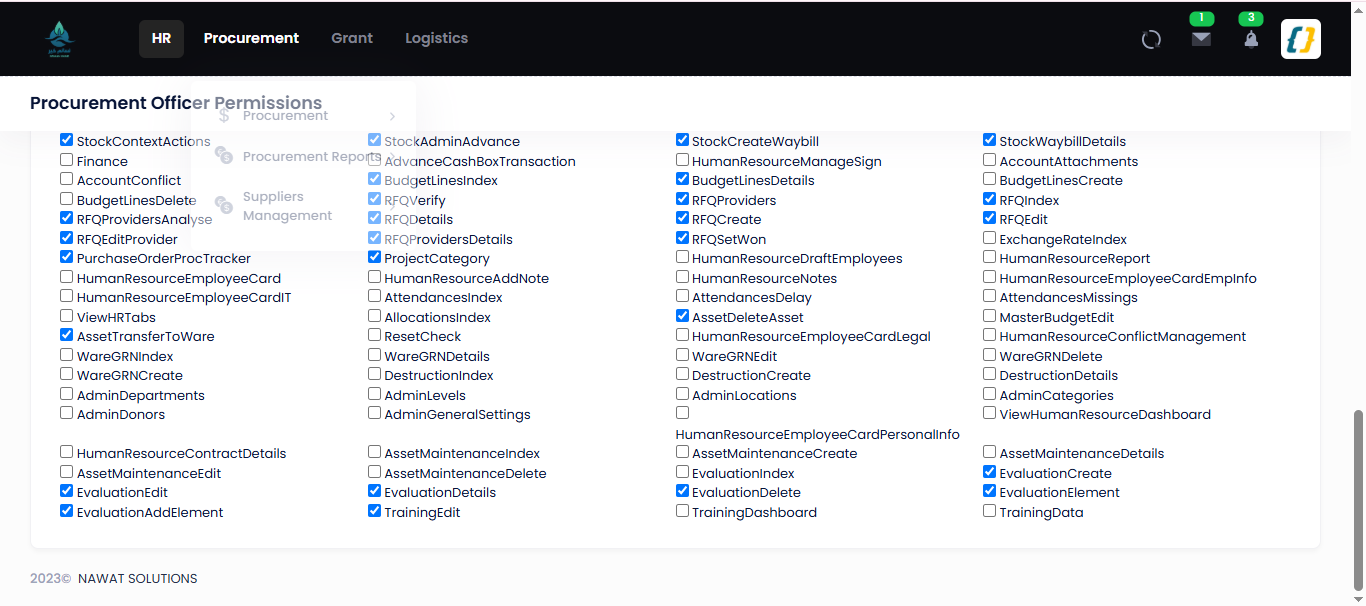
Permission keys attached to a group — /Admin/UserGroupEdit/{id}; each checkbox is one
AppPermission.PermissionName:
Showing and hiding UI
PermissionChecker is a scoped service injected into controllers, views and view components. Its
only method, HasPermission("<key>"), does a case-insensitive lookup in
CurrentRequestData.Permissions. It never blocks a request — it only decides whether a menu item, a
button or a table column is rendered (used in ~100 Razor views). The authoritative gate is still the
[ClaimRequirement] on the target action, so hiding a link is defence-in-depth, not the control
itself.
Data scoping (which rows)
A permission key answers "may this user open this screen"; data scoping answers "which records do
they see on it". Controllers call
userObject.GetPermission(SharedPermissions.<area>, currentUser.UserId) and switch on the returned
PermissionType:
DataPermissionType |
Effect |
|---|---|
All |
Every record. |
Location |
Records whose Branch equals the user's own branch. |
Custom |
Records whose Branch is in an explicit Branches list attached to the permission. |
Default |
Records belonging to the user's staff subtree (Staff). |
SharedPermissions areas: Users, Leave, Timesheet, PR, TrainingRequests, Advances,
SRF, Travel, Upgrades, Stocks, Assets, GDO, PO, Attendance, Overtime. The scope and
its branch list are stored in CommonSharedPermission / CommonSharedPermissionType /
SharedPermissionBranch. Project-level rights (ProjectPermissionTypes.View / Edit) live in
AppUserProjectPermission. BaseController.Employees / AllEmployees are the canonical example of
the switch in action.
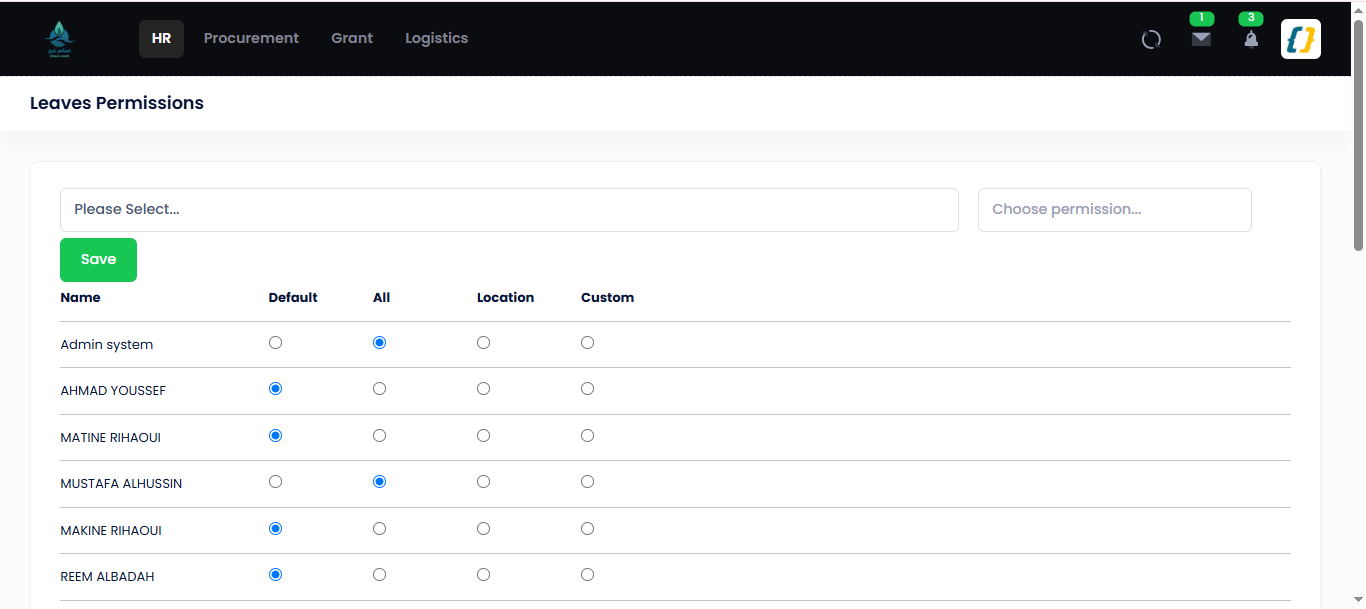
Data scoping per area, per user — /Admin/UserSharedPermissions → a SharedPermissions area
(here "Leaves"). Each user gets one of Default / All / Location / Custom:
The org hierarchy
StaffPermissionchecker walks AppUser.ManagerId and AppUser.TechManagerId (ignoring
IsPrivate accounts) to answer hierarchy questions used throughout the approval flows:
| Method | Returns |
|---|---|
Get |
Immediate reports only. |
Get |
The whole subtree including the user. |
Get |
The whole subtree excluding the user. |
Get |
The user, then each manager up the chain. |
Is |
Whether employee sits anywhere under manager. |
This is how "waiting for manager" is resolved: a request whose status is WaitingForManager appears
for whoever has the requester in GetDirectStaff.
System-role holders
Some steps are held by a single named office rather than a group. These are resolved by helper, not
by permission key: BUser.GetHRManager(), GetFinanceManager(), GetCountryDirector(),
Bsettings.GetAllocator(), GetBranchesByTreasure(), GetMySupervisionDepts(). The underlying
configuration keys are in CommonSettings (Allocator, PayrollFinanceOfficer,
TravelFinanceOfficer, SafetyOfficer, CashBox, EmergencyBox).
Managing groups and permissions
AdminController screens. They do not each have their own key — several borrow one (R3-6):
| Screen | Route | Purpose |
|---|---|---|
| User Groups | / |
Create / list groups (roles). Key Admin. |
| Group members | / |
Add or remove members; toggle Is. Key User. |
| Group edit | / |
Attach permission keys to a group. Key Admin. |
| Shared permissions | / |
Set each user's Data + branch list for one Shared area. Key Admin. |
| …save | / |
The POST behind the screen above: replaces the users' Common rows for that area. It does not grant permission keys — there are no per-user keys; keys come only from groups. Key Admin. |
| Positions / departments | /, / |
Org structure that feeds the hierarchy. |
| Pending requests | / |
Cross-module queue of items awaiting the current user. Key Admin. |
Entities
AppUserGroup, AppUserGroupMember, AppUserGroupPermission, AppPermission,
AppUserProjectPermission, CommonPermission, CommonSharedPermission, CommonSharedPermissionType,
SharedPermissionBranch, plus ApplicationUser and AppUser.
Edge cases
| Situation | Behaviour |
|---|---|
| User in several groups | Permission keys are the union. Data scope is not per group — it is stored per user and per area (Common), and a user with no row for an area gets Default. |
Is |
Empty permission list — authenticates but can open nothing gated. |
Member row Is |
That group contributes no keys. |
Key present but data scope Default and no reports |
Screen opens; lists come back empty. |
| Permission changed while the user is active | Applies on the next request (security stamp interval = 0). |
| Action with no authorization attribute | Reachable by anyone, signed in or not — there is no fallback policy (R3-2). A few Base look-ups carry [Authorize] alone, which requires sign-in but no key. |
Related
- Authentication — how the login and
CurrentRequestDataare established. - HR Onboarding — assigning a new hire to groups and a manager.
- Leave Management — the hierarchy and system-role holders driving an approval chain.
- Security & Permissions — architectural view.